How to Deposit to CacaoCash with Venmo or PayPal (2026)
TL;DR
Venmo and PayPal can buy and send PYUSD (PayPal USD) on the Solana network, and CacaoCash gives you a Solana deposit address to receive it. Buy PYUSD at 1 USD : 1 PYUSD, copy your address from CacaoCash, send the PYUSD, and the dollars land in your wallet in under a minute, ready to pay QR codes in Argentina.
Venmo and PayPal are two of the easiest ways to fund a CacaoCash wallet from the United States. Both apps let you buy and send PYUSD (PayPal USD) on the Solana network, and CacaoCash gives you a Solana address to receive it. You buy PYUSD inside Venmo or PayPal, send it to your CacaoCash address, and it lands as digital dollars, ready to pay QR codes in Argentina, no DNI and no local bank account required.
This is a two-part flow: first you buy PYUSD, then you send it. The screenshots below are from Venmo, but the steps in PayPal are nearly identical. The first time, it takes about five minutes. After that it's under a minute.
What's Actually Happening
It helps to understand the moving parts before you start:
- CacaoCash holds digital dollars on Solana. When you open the PYUSD deposit option, the app shows you a Solana deposit address tied to your account.
- Venmo and PayPal both support PYUSD on Solana. You first buy PYUSD at a flat 1 USD : 1 PYUSD rate, then send it on-chain to any Solana address.
- The dollars arrive in CacaoCash, usually in under a minute, with no swap or conversion on the CacaoCash side.
You don't need any crypto experience. You're buying a digital dollar in one app and sending it to an address you copied from another.
Before You Start
- A verified CacaoCash account (sign up takes a couple of minutes, passport or national ID, no DNI).
- A Venmo or PayPal account with funds in your balance (both are available in the US). The amount you buy comes out of that balance or a linked payment method.
- The amount you want to deposit.
Step-by-Step, Part 1: Get Your CacaoCash Address
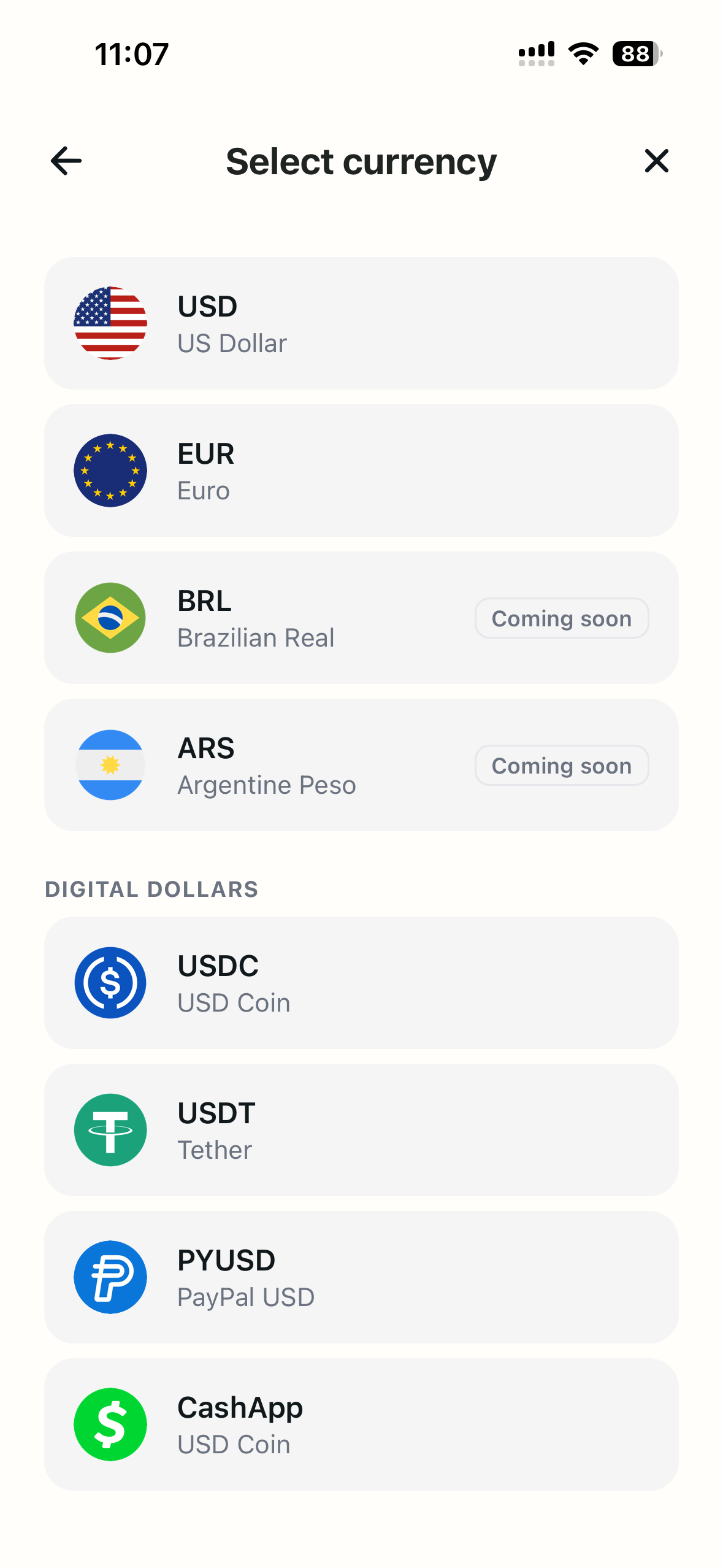
- In CacaoCash, open Deposit and choose PYUSD. Tap deposit, then on Select currency scroll to Digital Dollars and tap PYUSD (PayPal USD).
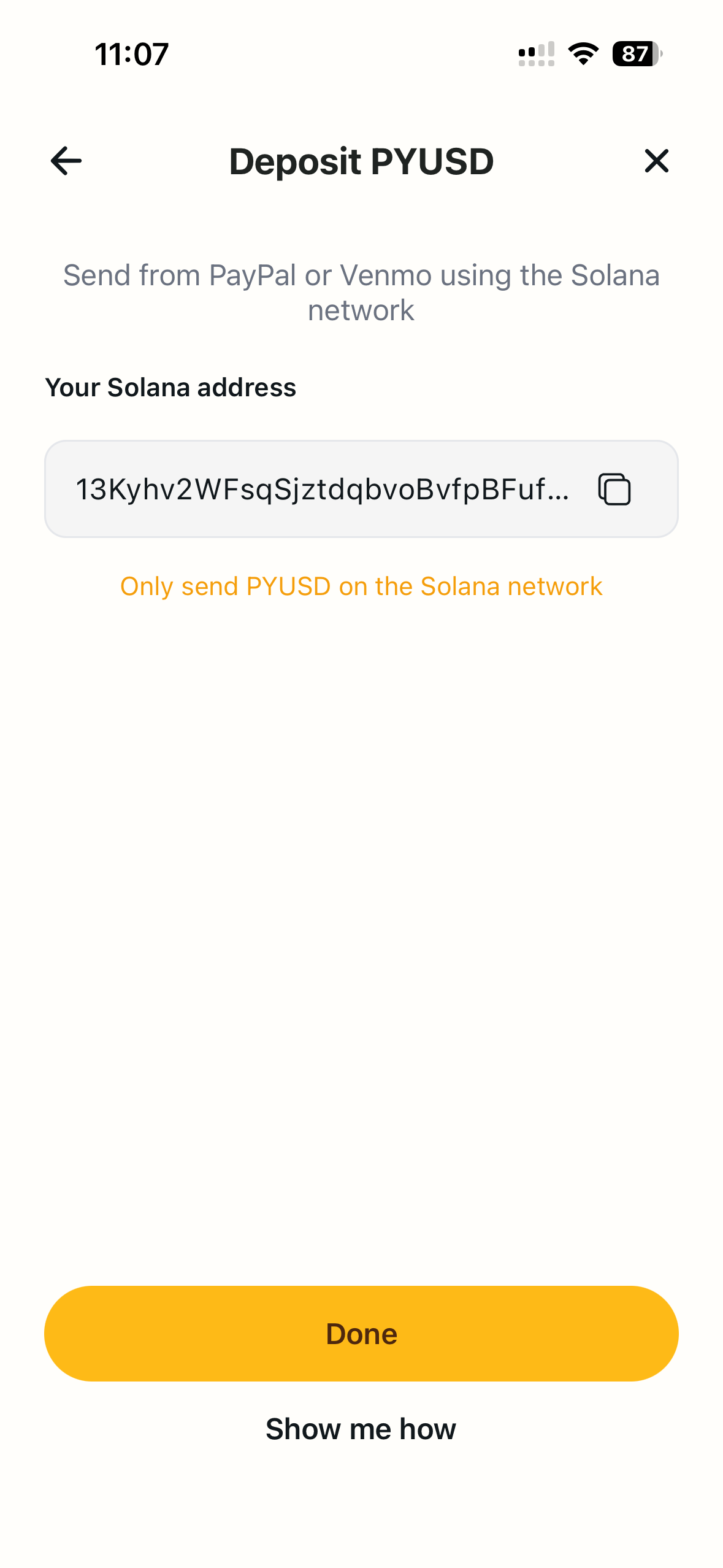
- Copy your Solana deposit address. The Deposit PYUSD screen shows Your Solana address. Tap the copy icon. Note the reminder: only send PYUSD on the Solana network.
Step-by-Step, Part 2: Buy PYUSD in Venmo
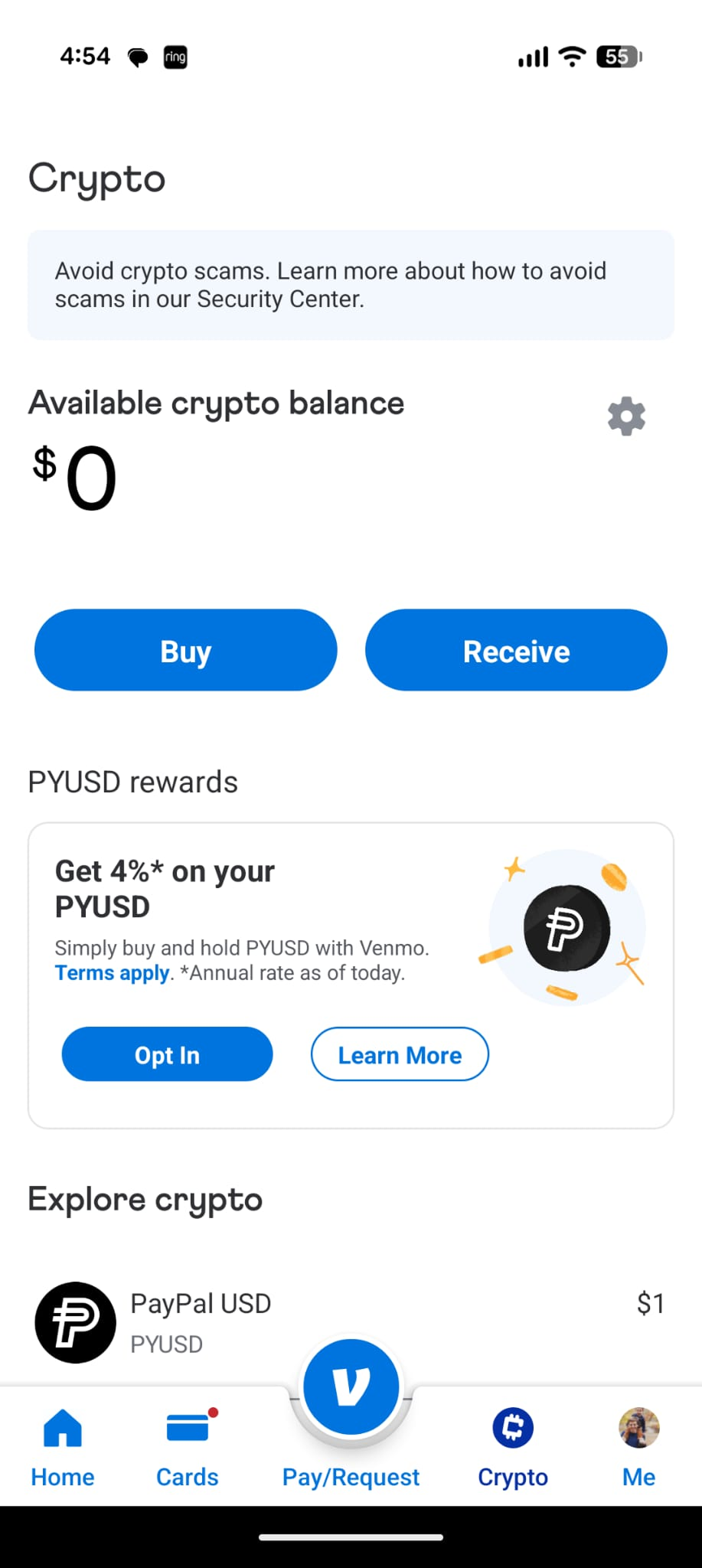
- Open the Crypto tab and tap Buy. In Venmo (or PayPal), tap Crypto in the bottom navigation, then tap Buy.
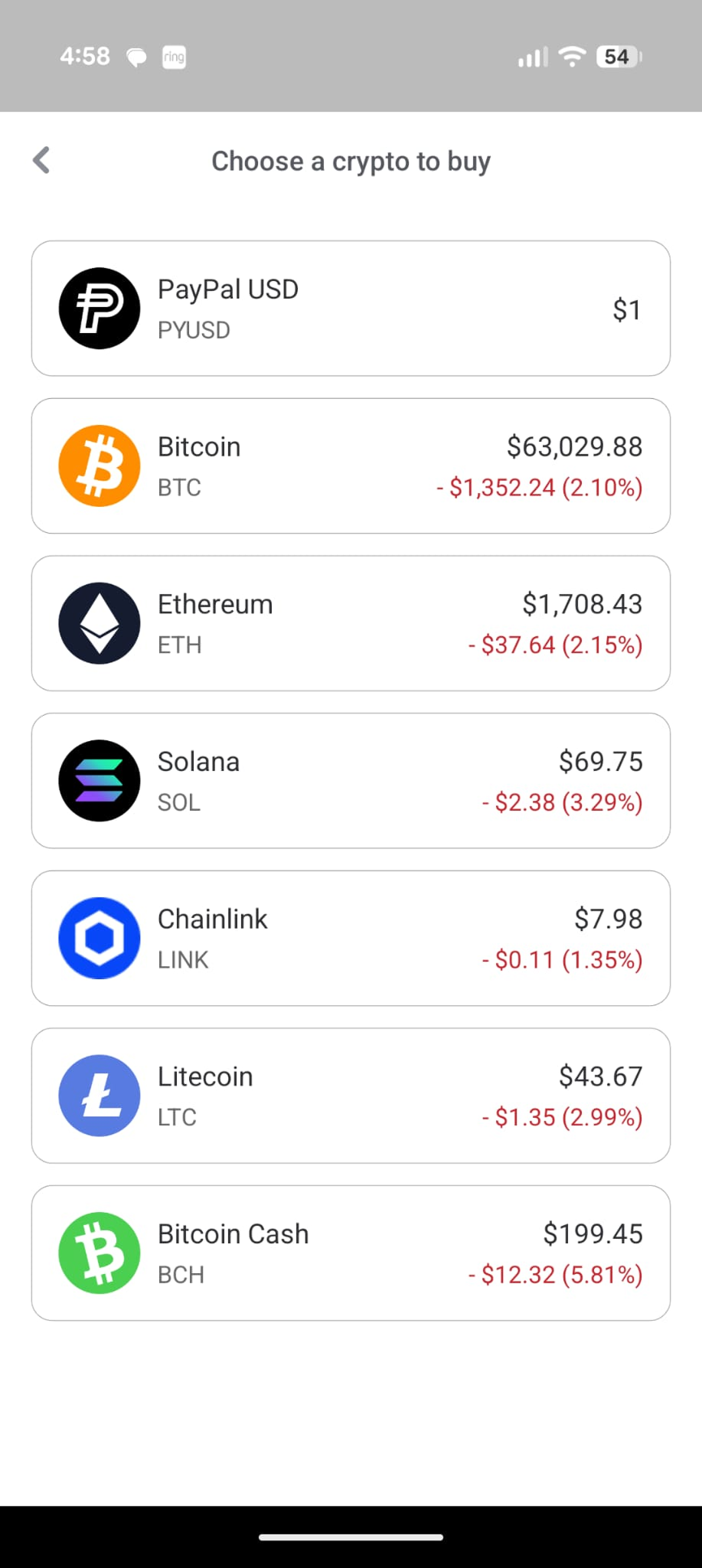
- Choose PayPal USD (PYUSD). On the Choose a crypto to buy list, tap PayPal USD at the top.
- Enter the amount and buy. Type how much you want (for example $100), review the summary, it should read 1 USD : 1 PYUSD, then tap Buy PayPal USD.
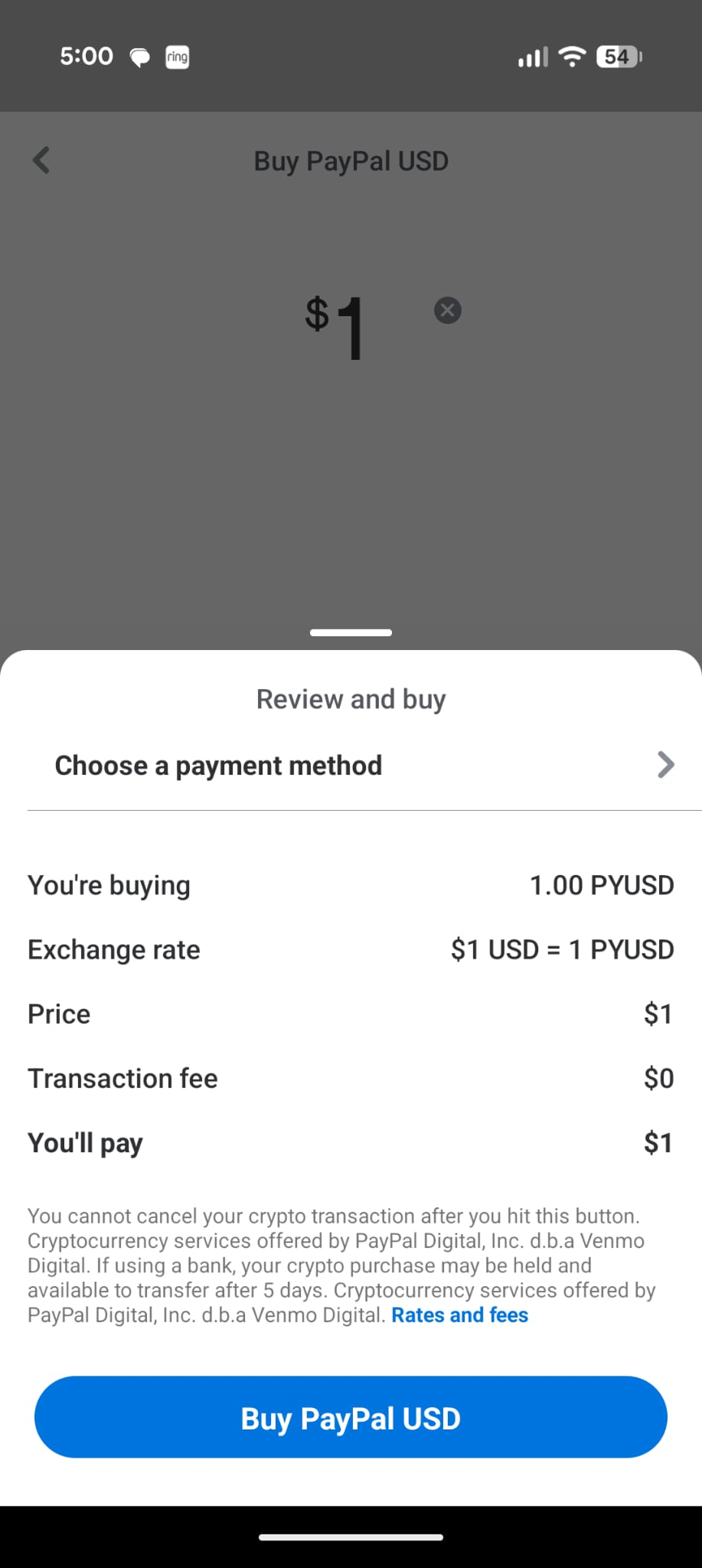
Step-by-Step, Part 3: Send PYUSD to CacaoCash
- Back in the Crypto tab, tap Send. Once your PYUSD shows in your balance, tap Send.
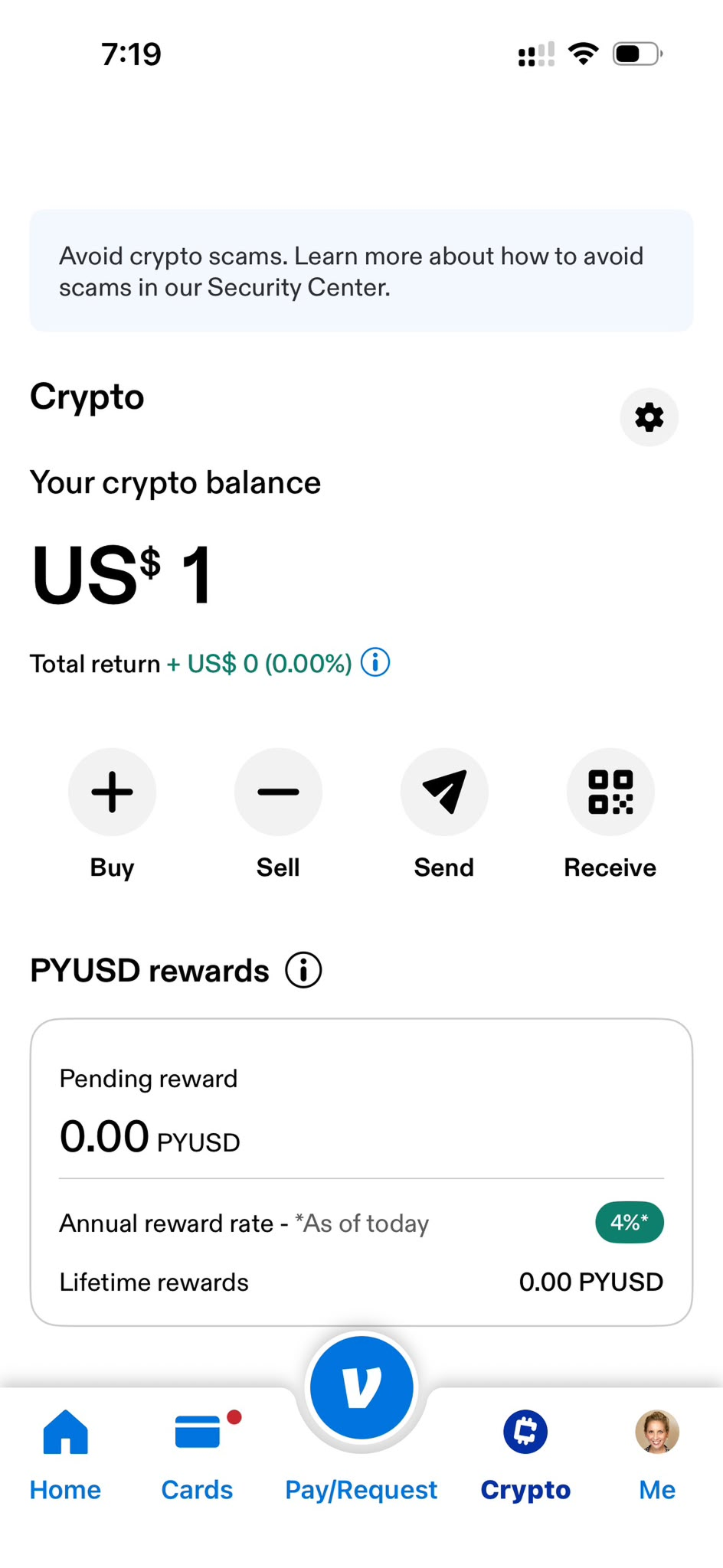
- Paste your CacaoCash address. In the recipient field (Name, PYUSD address, or ENS), paste the Solana address you copied from CacaoCash.
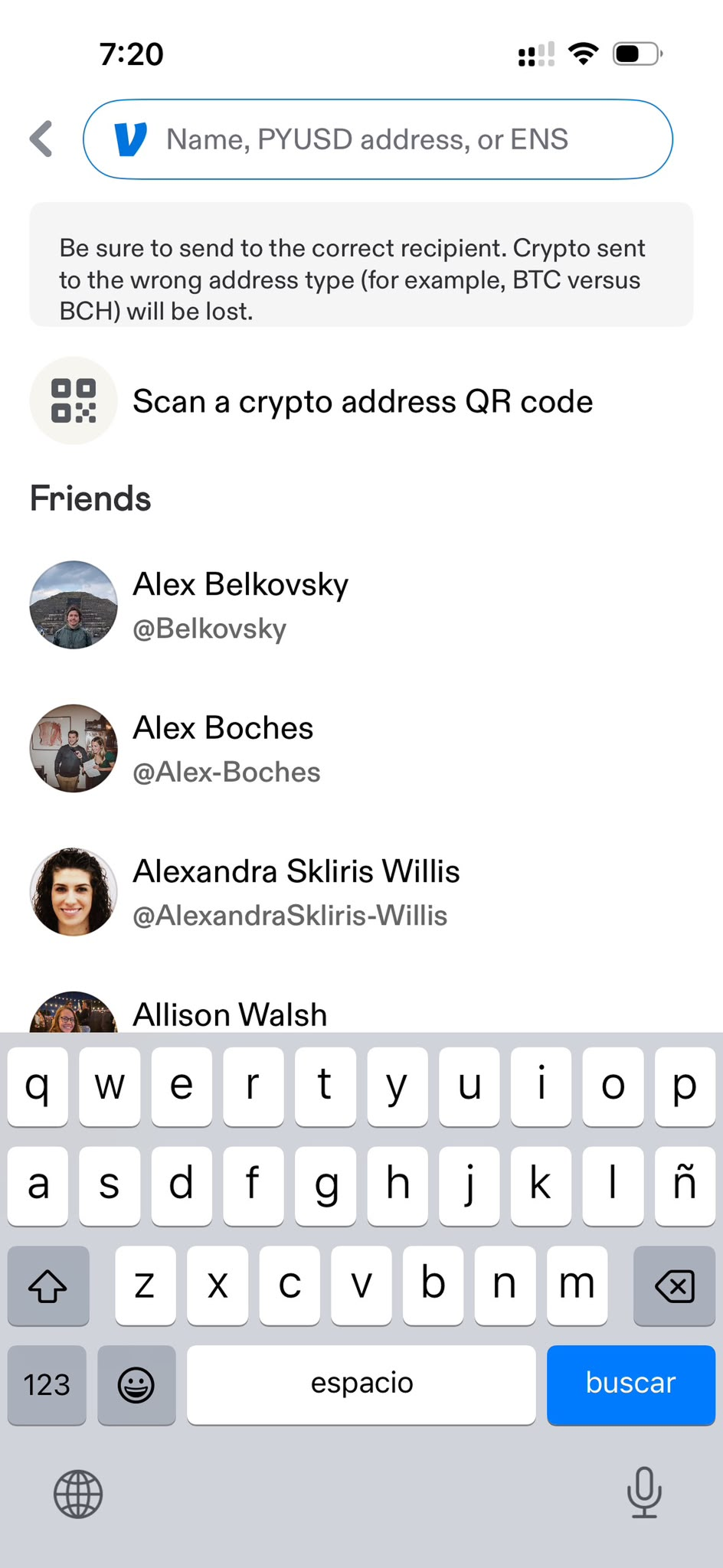
- Tap the Solana result and send. Venmo recognizes the address and shows a Send to result with the Solana logo. Tap it, confirm the amount, and send.
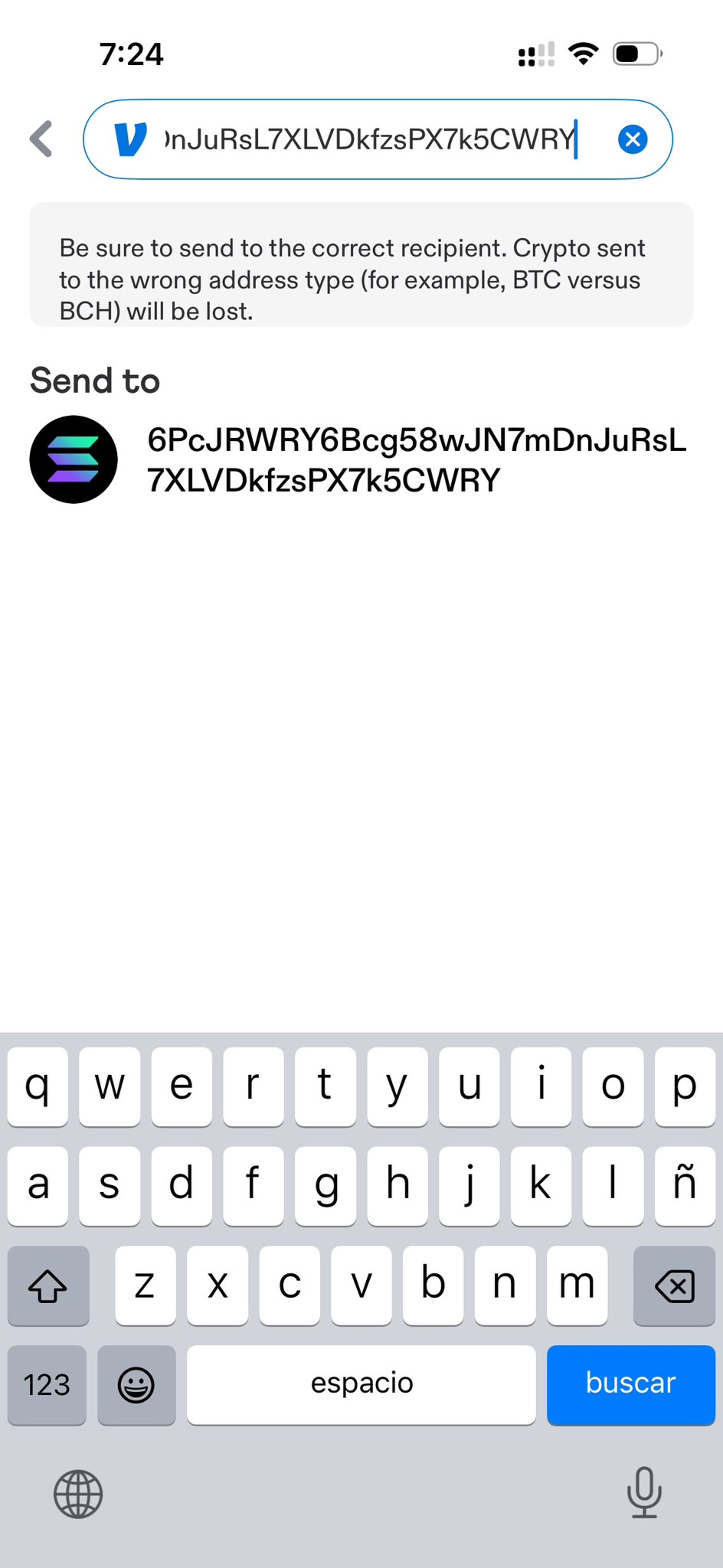
That's it. The PYUSD arrives in your CacaoCash balance, usually in under a minute, and you can start paying QR codes right away.
Important: Double-Check Before You Send
- Crypto transfers can't be reversed. Make sure the address matches the one in CacaoCash before tapping Send.
- Only send PYUSD on Solana. The CacaoCash address is a Solana address. Sending a different asset or using a different network can result in lost funds, Venmo warns about this too.
- Run a small test the first time. If you're nervous, send a few dollars first, confirm it lands in CacaoCash, then send the rest.
Why Deposit with Venmo or PayPal
For US-based travelers and expats, Venmo and PayPal are familiar, widely-used on-ramps into CacaoCash:
- Your dollars stay dollars. You buy and hold PYUSD, no early conversion to pesos at a tourist rate.
- It's fast. Solana settles in seconds, so deposits typically show up in under a minute.
- You pay like a local later. Once funded, you scan and pay any Argentine QR at the crypto dollar rate, no DNI, no local account. See how to pay QR codes in Argentina without a DNI, including how to pay Mercado Pago as a foreigner.
Frequently Asked Questions
What's the difference between this and depositing with Cash App?
With Cash App you send USDC directly. With Venmo and PayPal you first buy PYUSD (PayPal USD), then send it. Both arrive in CacaoCash as digital dollars on Solana. See the Cash App deposit guide.
How long does the deposit take?
Usually under a minute. Solana confirms transactions in seconds, and CacaoCash credits the PYUSD as soon as it lands on-chain.
What exchange rate do Venmo and PayPal use?
PYUSD is a dollar-backed stablecoin, so you buy it at a flat 1 USD : 1 PYUSD. You're holding the digital-dollar equivalent, one to one.
Which network do I use?
Solana. Your CacaoCash deposit address is a Solana address, and Venmo and PayPal send PYUSD on Solana. Don't use any other network.
Can I use Venmo or PayPal outside the United States?
Venmo is a US service; PayPal's crypto features are also US-focused. If you don't have access, you can fund CacaoCash other ways, including USDC from another wallet or exchange on Solana, or a bank transfer or card where available.
Ready to pay like a local?
CacaoCash lets you scan any QR in Argentina, no DNI, no local bank account needed.


About the author

Simon Gómez
Founder of CacaoCash. Simon has lived in Argentina as a foreigner and built CacaoCash so expats and nomads can pay like locals, no DNI, no local bank account. He writes about paying, getting paid, and not losing money to the tourist rate.
You might also like
- ArgentinaHow to Deposit to CacaoCash with Cash App (2026)
- ArgentinaHow to Pay QR Codes in Argentina as a Tourist (No DNI, 2026)
- ArgentinaMercado Pago for Foreigners: No DNI? Here's How to Pay (2026)
- ArgentinaHow to Pay in Argentina as a Tourist or Foreigner (2026)
- ArgentinaBlue Dollar vs MEP Dollar in Argentina (2026): Which Rate Should You Use?
- ArgentinaHow to Withdraw Pesos in Argentina Without Paying a Fortune (2026)