How to Deposit US Dollars to CacaoCash by Bank Transfer (ACH or Wire, 2026)
TL;DR
In CacaoCash, Deposit → USD shows a Lead Bank account in your name with routing and account numbers. Add it as an external account in your US bank (enter the two test deposits from the Activity tab if your bank sends them), then push an ACH (about one business day, free) or a wire (same day, bank fee). Dollars arrive one to one, no CacaoCash fee. Send from your own account; a business, a family member with your surname, or person-to-person under US$4,000 are also accepted.
CacaoCash gives you a US bank account in your own name, with a routing number and an account number. You add it to your bank like any other external account and push dollars to it by ACH or wire. The dollars land in your CacaoCash balance, ready to pay QR codes in Argentina or send pesos, no DNI and no Argentine bank account required.
This is the cheapest way to fund CacaoCash from the United States: no card fee, no conversion, one to one. The first time takes ten to fifteen minutes because your bank may want to verify the new account. After that, a transfer is a minute of your time.
How It Works
- You push, CacaoCash never pulls. You start the transfer from your bank. There is nothing to link on the CacaoCash side and no debit permission to grant.
- ACH or wire, your choice. ACH is free at nearly every US bank and arrives in about one business day. A wire arrives the same day but your bank usually charges for it. Banks that offer FedNow instant transfers can use those too.
- Dollars stay dollars. US$100 sent is US$100 in your balance. The conversion to pesos happens only when you pay, at the crypto dollar rate shown in the app.
Before You Start
- A verified CacaoCash account (passport or national ID, a selfie, a couple of minutes).
- Online or mobile banking at a US bank or credit union, with the account in your own name.
Step 1: Get Your Account Details in CacaoCash
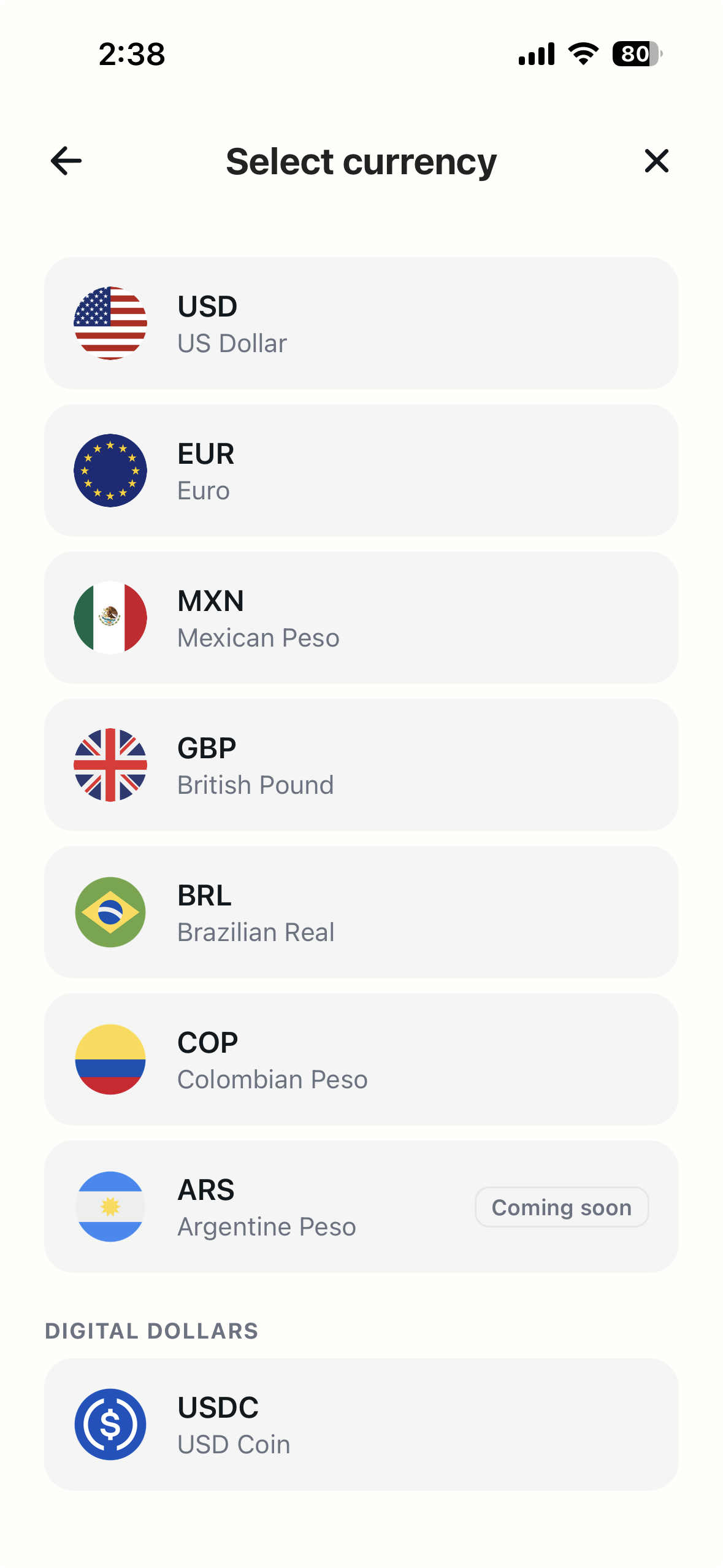
- Open Deposit. On the Home screen, tap Deposit, then on Select currency tap USD, US Dollar.
- Read the three intro cards (first time only). They explain the flow: send USD from your bank, add the account to your bank app, send and you're done. Tap Next through them and then Show me the details. Tick Don't show this again if you don't want to see them next time.
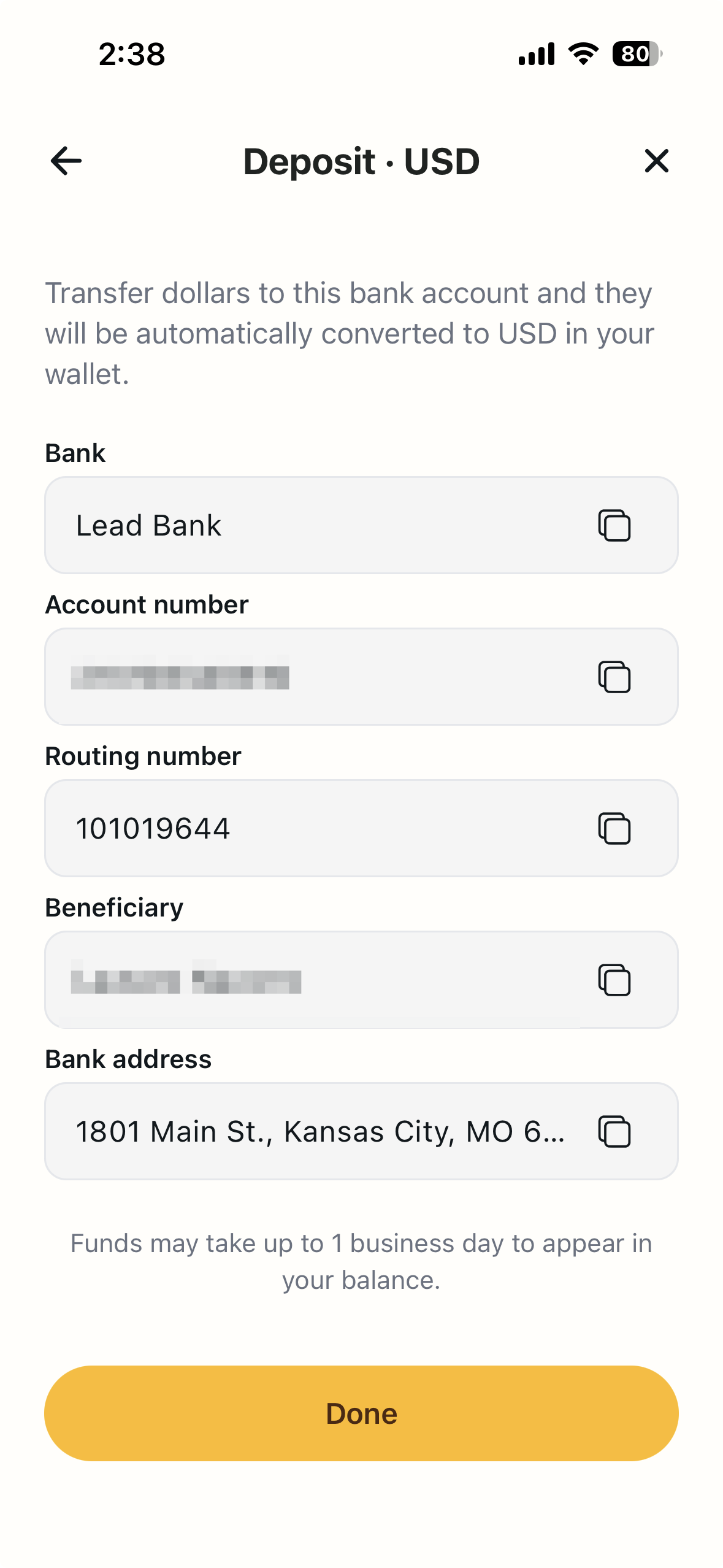
- Your details appear. The Deposit · USD screen shows the Bank (Lead Bank), your Account number, the Routing number, the Beneficiary (your own name) and the Bank address (Kansas City, Missouri). Each field has a copy button.
Step 2: Add the Account in Your Bank App
- In your bank app, look for Transfer → External accounts, Add account or Transfer to another bank. The wording varies by bank.
- Enter the routing number and account number from CacaoCash. Account type: checking. Account holder or nickname: your own name, exactly as it appears in CacaoCash.
- If your bank sends test deposits, wait a day or two. Two small amounts (a few cents each) will appear in your CacaoCash Activity tab labelled Bank verification. Type those amounts into your bank app to confirm the account. Some banks verify instantly instead and skip this.
Step 3: Send the Money
- Start a transfer from your checking account to the CacaoCash account you just added.
- Enter the amount. For ACH, choose standard or same-day if offered. For a wire, use the same routing and account number, beneficiary your name, and the bank address shown in the app.
- Confirm. ACH arrives in about one business day; wires and FedNow usually the same day. You get a notification and the deposit appears in Activity.
Not Comfortable With Routing Numbers?
If you'd rather pay from an app you already use, CacaoCash also accepts Cash App and Venmo or PayPal. Those arrive in under a minute, but the bank transfer in this guide is the one with no fees at all.
What You Can Do Once It Lands
Your balance is held in US dollars. From it you can scan and pay any QR code in Argentina, including Mercado Pago QRs, and send pesos to any alias, CBU or CVU for rent, a host or a friend. Every payment converts at the crypto dollar rate, which in October 2026 gives about 10% more pesos than a foreign card. See card dollar vs crypto dollar.
Frequently Asked Questions
Is there a fee?
CacaoCash charges nothing to receive a bank transfer. ACH is free at almost every US bank; wires usually cost US$15-35 on the sending side.
Why does my bank want test deposits?
It is how many US banks confirm you own an external account before letting you send to it. The amounts show up in your CacaoCash Activity tab within a day or two. Enter them in your bank app once and you never repeat it.
Can I link CacaoCash from inside my bank with Plaid or a login?
No. CacaoCash never pulls from your bank. Add the routing and account number as an external account and push the transfer yourself.
Is there a minimum or maximum?
No minimum on the CacaoCash side. Your bank's own transfer limits apply.
Can someone else send dollars to my account?
Your employer or another registered business can. A family member with the same surname can. Another person can send up to US$4,000 per transfer, unless they bank in New York or Texas. Outside those cases, use your own account.
What name do I put as the beneficiary?
Your own name, the one you verified with. It is shown in the Beneficiary field.
Ready to pay like a local?
CacaoCash lets you scan any QR in Argentina, no DNI, no local bank account needed.


About the author

Simon Gómez
Founder of CacaoCash. Simon has lived in Argentina as a foreigner and built CacaoCash so expats and nomads can pay like locals, no DNI, no local bank account. He writes about paying, getting paid, and not losing money to the tourist rate.
You might also like
- ArgentinaHow to Deposit to CacaoCash with Venmo or PayPal (2026)
- ArgentinaHow to Deposit to CacaoCash with Cash App (2026)
- ArgentinaHow to Pay QR Codes in Argentina as a Tourist (No DNI, 2026)
- ArgentinaMercado Pago for Foreigners: No DNI? Here's How to Pay (2026)
- ArgentinaHow to Pay in Argentina as a Tourist or Foreigner (2026)
- ArgentinaBlue Dollar vs MEP Dollar in Argentina (2026): Which Rate Should You Use?