How to Pay in Argentina with Pix as a Brazilian (2026)
TL;DR
In CacaoCash, open Deposit → BRL and you get a Pix QR code plus a copy-and-paste Pix code. Pay it from a bank account in your own name and CPF (minimum R$ 10), the reais become dollars in your balance, and from there you scan any Argentine QR or send pesos to an alias, CBU or CVU at the crypto dollar rate. No DNI, no Argentine bank account.
Pix does not work in Argentina. Your Brazilian bank app can't read an Argentine QR code, a Brazilian Mercado Pago account can't pay Argentine shops, and your card converts at the "non-resident" rate, which gives you about 10% fewer pesos than the rate locals get. The workaround is simple: load CacaoCash with a Pix from your own bank, then pay in Argentina from the app, scanning any QR code or sending pesos to an alias, CBU or CVU.
This guide shows the whole thing screen by screen: funding with Pix, paying a QR, and transferring pesos. The first time takes about ten minutes, most of it identity verification. After that, a Pix top-up is under a minute.
How It Works
- CacaoCash holds digital dollars. When you deposit reais via Pix, they are converted automatically to US dollars in your balance. You see the rate in the app.
- You pay in pesos from those dollars. When you scan an Argentine QR or send pesos to an alias, the app converts at the crypto dollar rate, which in October 2026 gives about 10% more pesos than a foreign card. See card dollar vs crypto dollar.
- No DNI, no CUIT, no Argentine bank account. You sign up with your Brazilian ID (RG or CNH) and your CPF.
Before You Start
- The CacaoCash app, with your identity verified. You need your Brazilian ID (RG or CNH), a selfie, and your CPF. A passport is not accepted for Brazilians, use your national ID. Verification usually takes a few minutes.
- A Brazilian bank or fintech account in your own name, with Pix enabled. This matters: the Pix must come from an account that matches the name and CPF you verified with.
Step 1: Get Your Pix Deposit Code in CacaoCash
- Open Deposit. On the Home screen, tap Deposit.
- Choose BRL. On Select currency, tap BRL, Brazilian Real.
- Create your account (first time only). A short intro screen, BRL deposits, explains that CacaoCash creates a virtual account in your name that receives Pix transfers from any bank in Brazil. Tap Continue. It takes a few seconds.
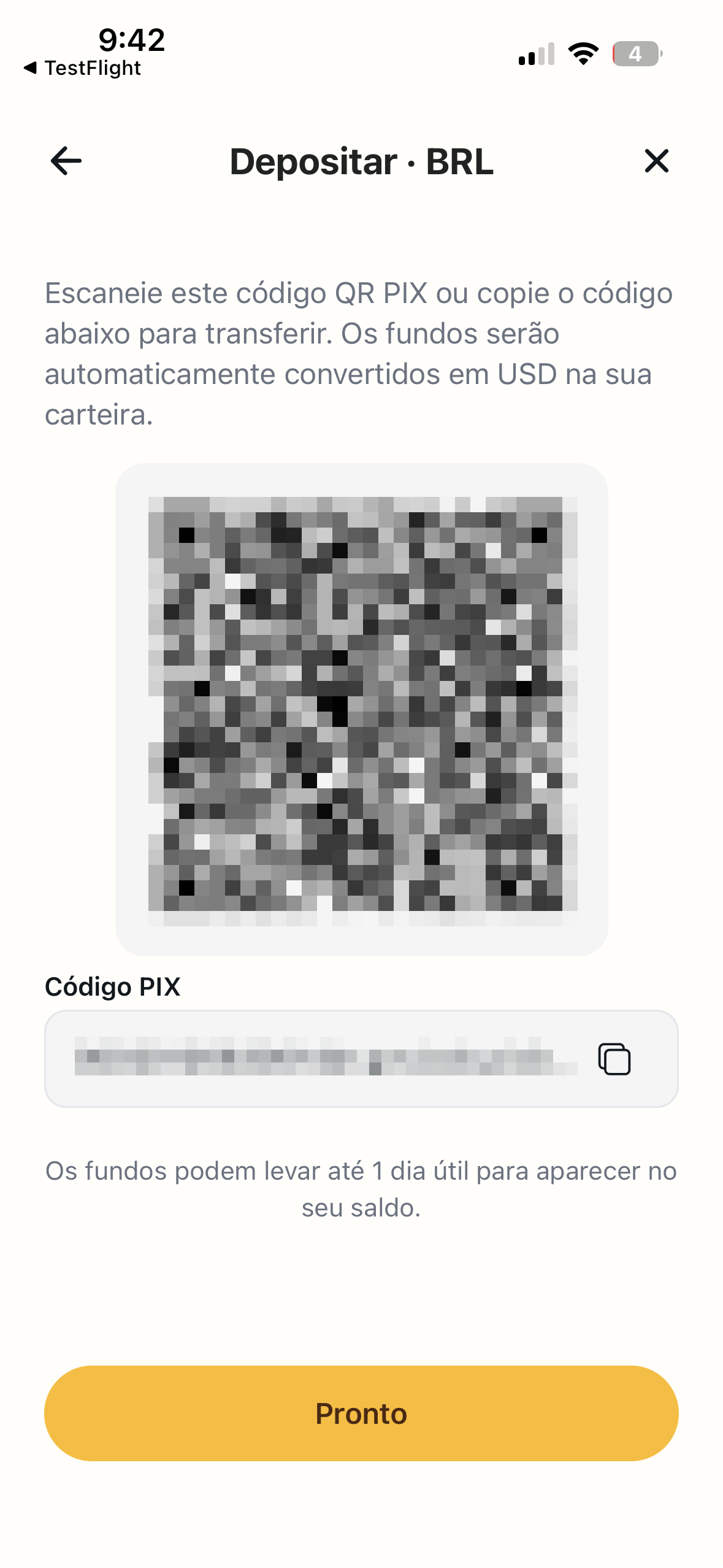
- You now see your Pix code. The Deposit · BRL screen shows a Pix QR code and, below it, the same code as text labelled PIX code with a copy button. This is your deposit code: it is tied to your account and you reuse it every time.
Step 2: Send the Pix from Your Bank
You have two ways to pay the code, exactly like paying any other Pix:
- Scan the QR. If you have the app open on another device, or you are showing it to yourself from a screenshot, open your bank app, choose Pix → Pagar com QR Code, and scan it.
- Pix Copia e Cola. On the same phone, tap the copy icon next to PIX code in CacaoCash, open your bank app, choose Pix → Pix Copia e Cola, and paste.
Then enter the amount in reais, check the details and confirm. The minimum is R$ 10. Pix settles instantly on the Brazilian side; CacaoCash credits the dollars once its banking partner processes the transfer, usually within minutes.
Step 3: Pay a QR Code in Argentina
Restaurants, kioscos, supermarkets, taxis and street vendors all show QR codes. Here is how to pay one:
- Tap the QR button in the middle of the bottom bar. The first time, allow camera access.
- Point at the QR code. If the code has no amount built in, type the amount in pesos.
- Check the preview. You see the merchant, the amount in pesos, what you pay in dollars, the fee and the total. The rate is locked for about five minutes.
- Tap Pay now. You get a Payment successful screen and the merchant sees a normal local payment.
At some shop counters the cashier has to register the charge before you can pay. The app tells you when that is the case: say you want to pay by QR, wait for the cashier, then confirm. For more detail, see how to pay QR codes in Argentina without a DNI and how to pay Mercado Pago QRs as a foreigner.
Step 4: Transfer Pesos to an Alias, CBU or CVU
Rent, an Airbnb host, a tour guide, a friend who paid the bill: in Argentina you settle these by transfer to an alias (a nickname like juan.perez.mp), a CBU (bank account) or a CVU (wallet account). CacaoCash does it from your dollar balance:
- On the Home screen, tap Send, then ARS transfer (Alias, CBU or CVU).
- Type the alias, CBU or CVU. The app looks it up and shows the account holder's name, CUIT/CUIL and account type so you can confirm you have the right person.
- Enter the amount in pesos. The screen shows the minimum and maximum, the fee and the total in dollars.
- Tap Send. You see ARS transferred with the recipient's name and alias, and they receive pesos in their account in seconds.
If you are not sure what to ask the other person for, read CBU vs CVU vs alias. For bigger payments like rent, see how to pay rent in Buenos Aires as a foreigner.
Tips
- Top up before you need it. Send the Pix the day before a trip or in the morning, so the dollars are there when you sit down to eat.
- Try a small amount first. If it is your first deposit, send R$ 20, watch it arrive in the Activity tab, then send the rest.
- Keep some pesos in cash for small things. A few places still only take cash, but QR is accepted almost everywhere in the big cities.
- Don't carry reais to exchange. Reais get a poor rate in Argentina, and the cash houses add a spread on top. Pix into CacaoCash and spend dollars at the crypto rate instead.
Frequently Asked Questions
Can I pay an Argentine QR code directly with Pix from my bank?
No. Pix is a Brazilian system and Argentine QR codes run on Argentina's own rails. You need a balance in an app that pays locally, which is what CacaoCash does.
Can a family member or friend send the Pix for me?
No. The deposit has to come from an account in your own name and CPF. A Pix from someone else is returned to their account. Transfers from a company account (CNPJ) are accepted.
How long does the deposit take?
The Pix itself is instant. The dollars usually show up in CacaoCash within minutes.
Is there a minimum?
R$ 10 per Pix.
What rate do I get?
Two conversions happen. Reais to dollars when you deposit, at the rate shown in the app, and dollars to pesos when you pay, at the crypto dollar rate. In October 2026 the crypto dollar buys about 10% more pesos than a foreign card's non-resident rate. The app always shows the exact amount before you confirm.
Do I need a DNI or an Argentine account?
No. You verify with your Brazilian ID (RG or CNH) and your CPF. A passport is not accepted for Brazilians, and nothing Argentine is required.
Can I use the same Pix code again?
Yes. The QR and the Pix code are your permanent deposit details. Open Deposit → BRL any time and they are there.
Ready to pay like a local?
CacaoCash lets you scan any QR in Argentina, no DNI, no local bank account needed.


About the author

Simon Gómez
Founder of CacaoCash. Simon has lived in Argentina as a foreigner and built CacaoCash so expats and nomads can pay like locals, no DNI, no local bank account. He writes about paying, getting paid, and not losing money to the tourist rate.
You might also like
- ArgentinaHow to Deposit to CacaoCash with Venmo or PayPal (2026)
- ArgentinaHow to Deposit to CacaoCash with Cash App (2026)
- ArgentinaHow to Pay QR Codes in Argentina as a Tourist (No DNI, 2026)
- ArgentinaMercado Pago for Foreigners: No DNI? Here's How to Pay (2026)
- ArgentinaHow to Pay in Argentina as a Tourist or Foreigner (2026)
- ArgentinaBlue Dollar vs MEP Dollar in Argentina (2026): Which Rate Should You Use?